The Wonder of Tech: EasySign for signing documents on the go
This iPhone and Android app lets you sign important papers without too much interruption of your life.
You're finally relaxing on a beach, enjoying a well-deserved vacation when you receive an urgent message from the office. The deal that you thought was closed has a glitch, and your office needs one final signature from you.
 You could leave the beach and try to find a computer, printer and scanner. Or you could use an app that will allow you to sign the document without leaving your beach chair.
EasySign can solve the problem of needing to sign documents on the go. It works on the iPhone, iPad, iPod Touch and Android devices and allows you to sign any document - regardless of your location.
After you download the app, you can create an account or sign in with your Facebook account. To try out the app, go into My Documents from the app's home pag. There you can practice signing a demo document.
The app guides you through the process of creating your signature. You can choose among several colors to further identify your signature. Once you have settled on your signature (it took me a few tries on my iPhone), you can save it.
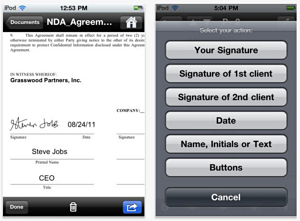 If you want to sign an official document, you can add the document to the app through email or, if you have a premium account, by using such cloud services as Dropbox or Box.net. You can load the documents on the app from your smartphone's email app or forward an email to docs@easysignmobile.com.
Once the document is loaded into the app, you enter the signature, name, date and initials for yourself and up to two others. This information can be added to the signature page and other pages, which allows you to approve changes to a document.
Press "Finish" and a copy of the document is sent to your email, which can be forwarded to those who need it. EasySign keeps your signed document, if you need to retrieve it later for any reason.
For added security, you can protect your signature in the "Security" section of "Settings." There are options to add a passcode lock and allow automatic login.
Here is a video from the developer showing how to use EasySign:
The app is available in English, Spanish, German, French, Italian and Russian and supports international characters, including Chinese, Japanese, Korean, Hebrew and Arabic.
I asked the developer about the acceptance of signatures used through this app. According to the developer, "Electronic signatures, they are legally binding in many countries worldwide including USA, Canada, UK, Australia, European Union and many others. We follow the best practices of the Global and National Commerce Act (ESIGN) and Uniform Electronic Transactions Act (UETA)."
The app is free, but there is a charge for signing documents. Initially, you are given credits for signing three documents. The cost of purchasing credits:
$1.99 for 5 documents
$9.99 one-time fee for unlimited documents (this is a limited offer)
EasySignMobile is available in the iTunes App Store and the Android Market.
Carolyn Nicander Mohr is a Chester County resident and creator of the website, The Wonder of Tech. Contact her at wonderoftech@gmail.com.