Jonathan Takiff: Smart Swipe dodges credit-card hassles
THE GIZMOS: SmartSwipe online credit card swiper; FlipShare TV. CARD SHARK: For a serious online shopper, the SmartSwipe answers prayers and concerns.
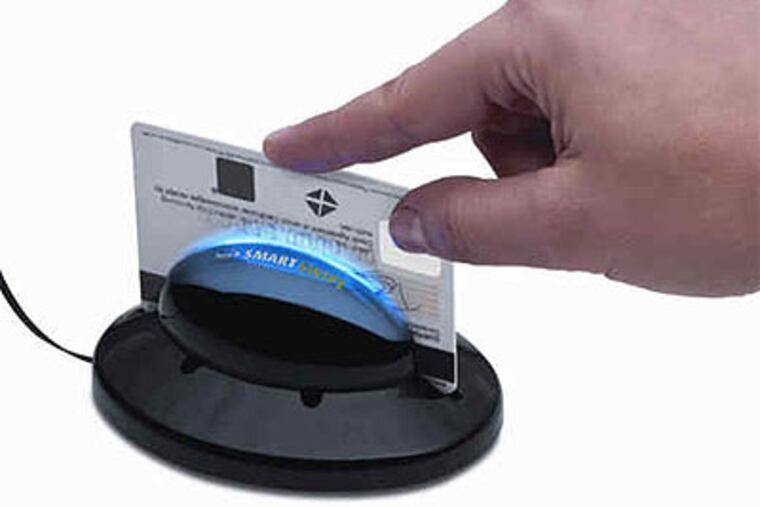
THE GIZMOS: SmartSwipe online credit card swiper; FlipShare TV.
CARD SHARK: For a serious online shopper, the SmartSwipe answers prayers and concerns.
A scaled-down, home version of the credit card swiper we use at stores, SmartSwipe hooks up to a Vista, XP or Windows 7 computer (running Internet Explorer 6 or later) via the PC's USB port. After installing a bit of software and registering the device, you can then speed and secure the buying process at shopping sites, with the mere wave of a card.
You don't even have to answer the question, "Credit or debit?" Just tap the "Smart Swipe" icon on your computer's toolbar at checkout, and special software walks you through the purchase.
The device works with all major credit cards (Visa, MasterCard, American Express, Discover) and at "98 percent" of online retailers in North America, claims its Canadian-based manufacturer. Family and friends can also use your device with their cards.
THE VALUE? PRICELESS: In the short run, a SmartSwipe user avoids the tedium of entering a credit-card number. In the long run, you're getting peace of mind that no malware or spyware will steal your credit card vitals while you're tapping in the keystrokes or unknowingly storing the numbers on your PC.
The egg-sized device encrypts info before it enters your computer. So the credit card number never gets stored locally. SmartSwipe uses a technology called Dynamic SSL with the same level of encryption used in bank machines and ATMs.
BUYER CAUTIONS: Some online reviewers have shared installation woes. So let me underscore - this gizmo only works with relatively recent (like, of this decade) PCs running Internet Explorer, and not with Macs, which aren't nearly as vulnerable to spyware, anyway.
If a favored credit card doesn't register in the device, that's probably because the magnetic strip is worn, or you didn't slide it through with just the right touch. SmartSwipe's reader mechanism isn't quite as forgiving as those on professional-grade machines.
But take comfort, even if you swipe a card multiple times, the device will still only register one charge per transaction.
A recent software upgrade has corrected some operating concerns. And if SmartSwipe just doesn't work for you, the maker offers a 90-day "no hassle" return policy.
Thinking about SmartSwipe as a gift? Better offer it unwrapped, or with a tag that says "Open me first - like right now." For some potential users, post-Dec. 25, it might be as useful as a snowblower in July.
Retail price is $99, though the gizmo is now discounted to $80 or less. For more info, visit www.smartswipe.ca.
SMILES ALL AROUND: Owners of those most popular palm-sized camcorders now have new reasons to "Flip." A new $149 accessory system for Flip camcorders called FlipShare TV will allow you to watch and enjoy the Flip videos you've stored on your computer on a big-screen TV set located even a floor or two away.
FLIPPING OUT: In recent years, these pocketable Flip cameras have become a serious rival to the likes of Sony and Samsung. Now owned by Cisco Systems, Flip is currently ranked by NPD Group as the second most popular camcorder brand.
It helps that its cameras are tiny, attractive, easy as pie to operate and reasonably affordable - available in $149 to $229 versions shooting in standard definition or 720p high def, and with one or two hours of built-in movie storage memory.
Perfect for non-techies, a Flip also connects easily to a standard or high definition TV for playback.
Or just flip-out its built-in USB plug and connect the device to a computer. Built-in FlipShare software efficiently loads, moves captured images onto the computer's hard drive and lets you whisk clips to friends' e-mail addresses, Facebook pages or mobile phones. An iPhone app has been available for awhile, and starting today Flip videos are also viewable on BlackBerry and Android-based smart phones. Family and friends also can hop onto their computer and share the videos you've deposited on your FlipChannel.
MOVING THOSE PICTURES: Setting up a three-piece FlipShare TV system is equally easy. Part one is a small USB Key (aka thumb drive) that gets inserted into a computer and automatically loads an even better version of Flip software. That thumb drive also holds a built-in 802.11n Wi-Fi transmitter, which then starts looking for and wirelessly handshaking with its companion TV signal receiver.
That second device, the TV Base, is a small white box which you've connected elsewhere in the home to a power outlet and a TV set via either standard definition composite (yellow, red and white) cables or an integrated HDMI digital cable. The latter allows for 720p high def reception of FlipHD recordings.
Part three of the system is a small wireless remote, used to select from the menu of videos and FlipChannels that pop up on your TV screen.
In my house, a FlipShare TV signal moved well from transmitter to receiver (and TV) located one floor and 20 feet away. But the Wi-Fi signal couldn't get to the next farthest set - about 50 feet from the source.
The computer storing your Flip videos must be left on when viewing the show. Even at a distance, blown up on a big screen, picture and audio performance seemed as good as on my base computer's monitor.
A well-lit and steady-handed FlipHD video looks truly high def. Picture quality degrades, though, in low lighting conditions or if captured by a shaky shooter.
FlipShare TV goes on sale today at a variety of online sites, including theflip.com, amazon.com, bestbuy.com. target.com and walmart.com, and is coming soon to stores.